12 posts tagged with "Enterprise AI"

Enterprise AI platforms, AI Agents, and AI operations

View all tags

Responding to AI-Era Security Threats with AI-MiWork Guard

· 4 min read
Minisoft AI Platform Tech Blog Author

Reading a security advisory is not the same as completing the response.

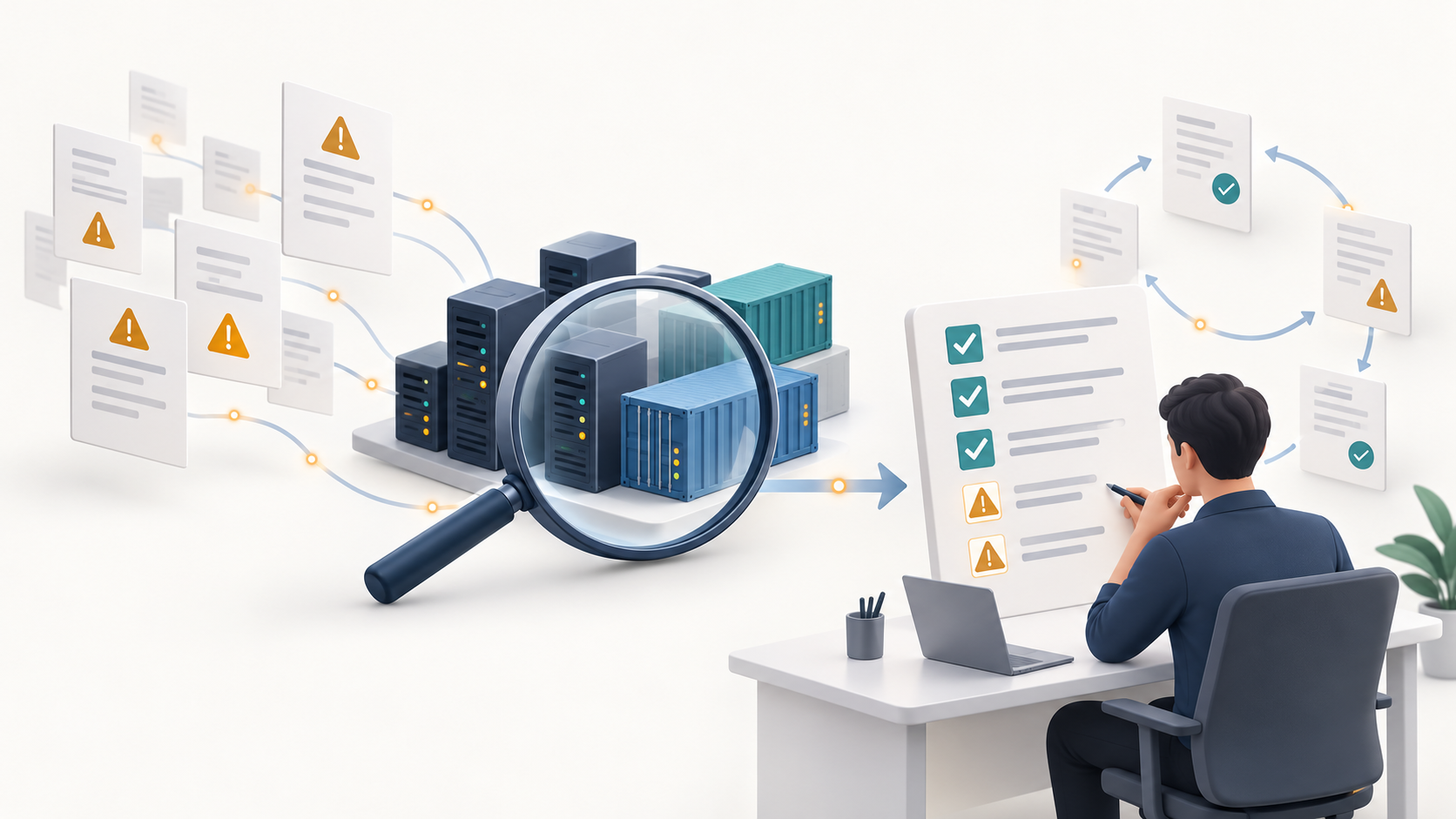
MiWork Guard finds what needs attention, prioritizes the work, and revalidates the result. AI organizes the evidence and risks; administrators decide how to respond. The process becomes a trustworthy record.12

Illustration connecting security advisories with inspection and administrator-led action

An illustration of the product's purpose, not an actual screen. Click any image in the article to view the original.

Why it matters now​

AI can increase the speed and scale at which attackers find and exploit weaknesses. Preparing for new threats must go hand in hand with basic work to reduce known risks.3

Recent incidents leave a familiar task:

  • On October 12, 2026, GitLab released important security fixes and urged affected users to update promptly.4
  • The investigation into LiteLLM's compromised October 21 release described a previously exposed administrative key that had not been revoked.5

When a vulnerability has an effective fix, applying the security update in time can close the corresponding attack path. Other issues require actions beyond updating software. NIST's description of patching as preventive maintenance includes applying the relevant fixes and verifying the result.6

The practical challenge comes next. Purchased products, open-source programs, and libraries publish notices and updates on different schedules. Keeping track of what affects the company, who addressed it, and what remains is not easy.

Turn findings into prioritized work​

MiWork Guard compares software and components observed on servers with security information. The report answers three practical questions:17

  • Where is the affected software? Its location and current version.
  • What should change first? Target versions and work priorities.
  • Can it be fixed now? Fix availability and items whose actual use needs confirmation.

AI reviews collected evidence and organizes risks that deserve further attention. It supports the administrator's judgment rather than making arbitrary changes to the server.1

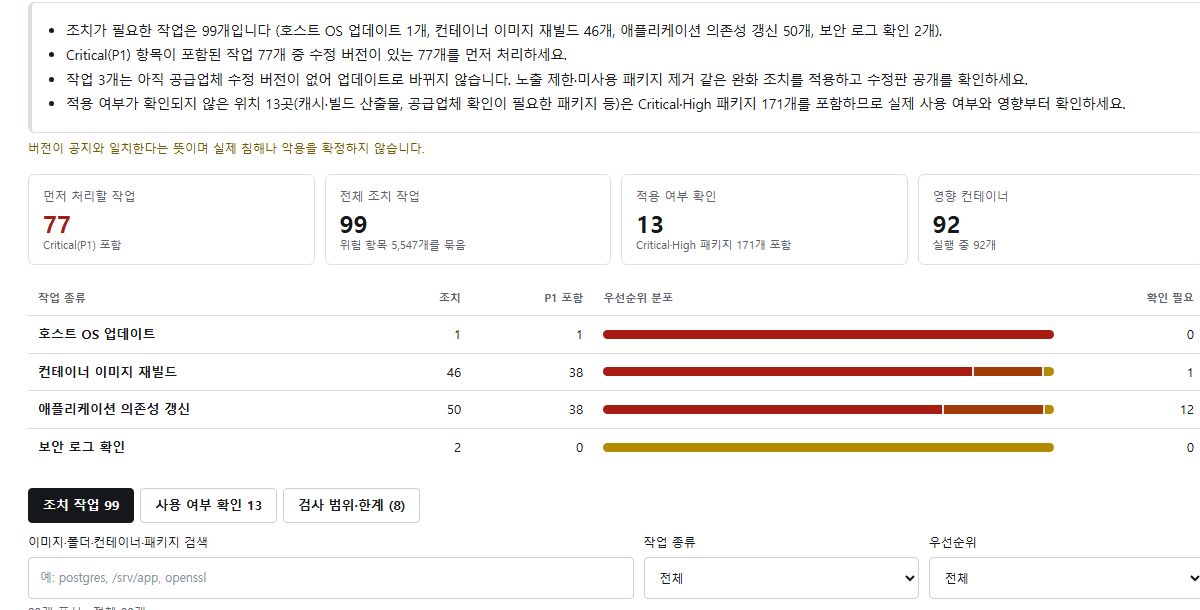
Turn a long list of warnings into work someone can carry out. Action plans and task lists can be saved as reports or spreadsheet-compatible files and shared with the person responsible.7

Actual action-plan screen showing priority summaries and work categories

Actual action-plan screen. Internal identifying information is excluded.

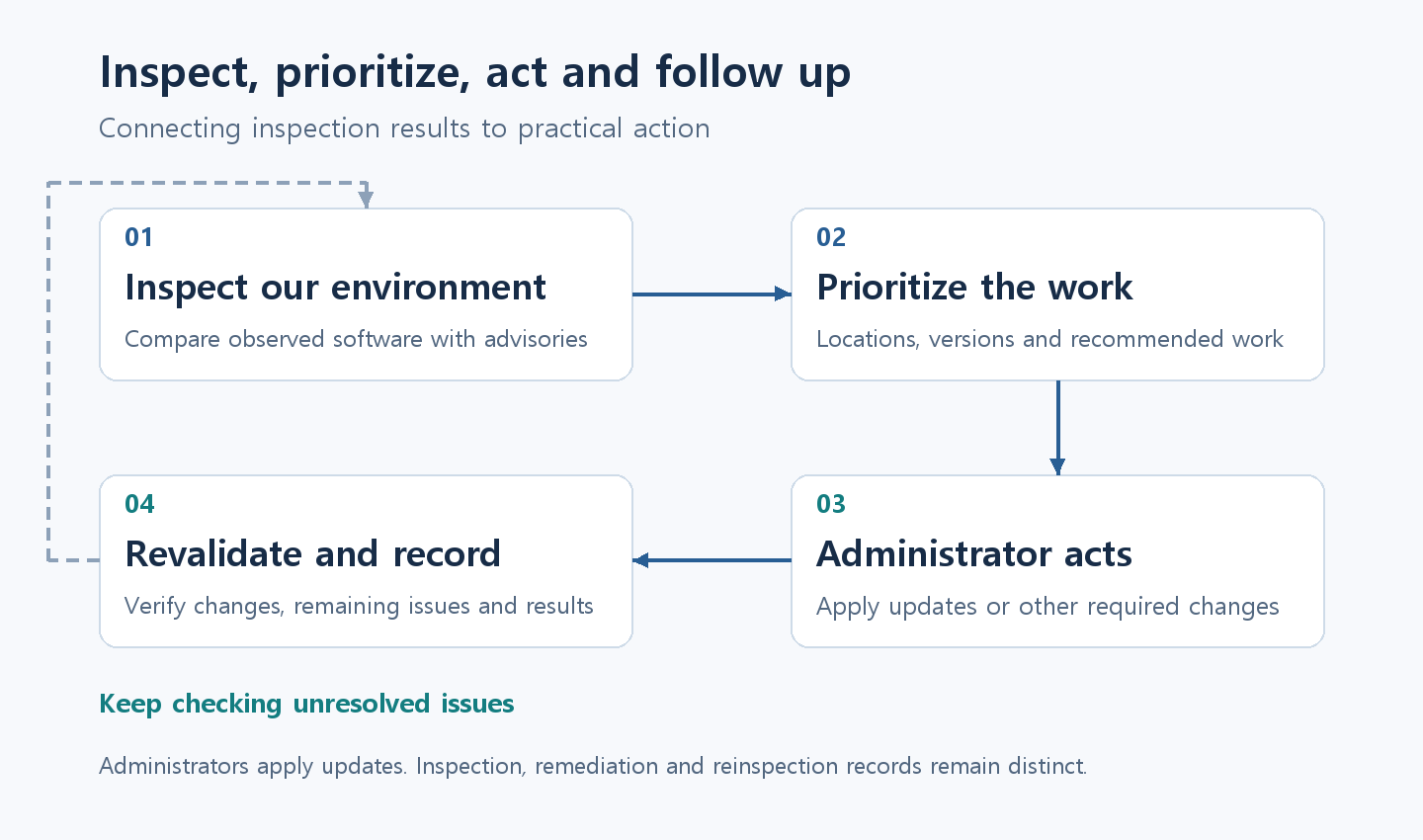
Four steps from inspection and prioritization to administrator action, revalidation, and records

Revalidate the result and keep the record​

A completed inspection is not a completed update. After the administrator performs remediation, another Guard inspection checks whether the change took effect and whether the previously observed issue remains.172

Connecting the initial findings, response records, and revalidation results shows what was found, how it was addressed, and what changed afterward. Trust comes not simply from keeping a record, but from checking the remediation result again.2

Tamper prevention protects those records. Remaining issues and uninspected areas stay visible, informing the next inspection or handover. This is not a guarantee of safety beyond the inspected scope.12

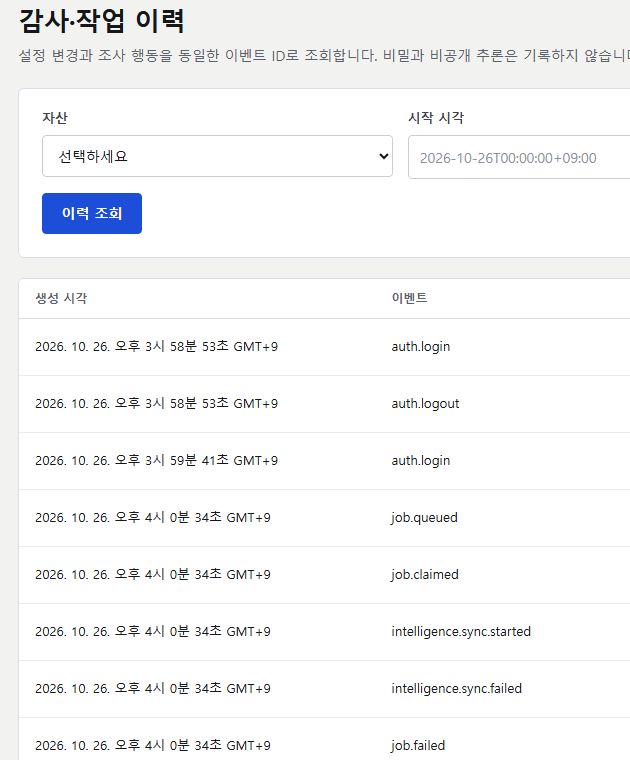
Actual history screen showing event times and activity records

An excerpt from the actual activity history. Internal identifying information is excluded.

The current scope is Linux servers and running Docker containers. Administrators perform the actual updates; areas that could not be fully checked are marked partial or uninspected.17

The gap is often not a lack of security knowledge, but the amount of work to keep in view. Reducing that gap and following through with action and revalidation is why MiWork Guard is needed.


References​

Footnotes​

  1. MiWork Guard product overview and FAQ ↩ ↩2 ↩3 ↩4 ↩5 ↩6

  2. Product owner information: existing remediation-history and evidence integration, and record tamper prevention. November 3, 2026. ↩ ↩2 ↩3 ↩4

  3. NCSC — Frontier AI: what you need to know ↩

  4. GitLab — Critical Patch Release 19.4.2, 19.3.5, 19.2.8, October 12, 2026. ↩

  5. LiteLLM — The attack chain behind the v1.107.0 LiteLLM release, incident October 21, 2026; investigation published October 23, 2026. ↩

  6. NIST — Guide to Enterprise Patch Management Planning ↩

  7. MiWork Guard product screens: investigation reports, action plans, vulnerability information, and audit history. Reviewed November 3, 2026. ↩ ↩2 ↩3 ↩4

MiWork Agents evolves into an AI collaboration workspace

· 7 min read
Minisoft AI Platform Tech Blog Author

TL;DR MiWork Agents started as a place to talk with AI. It has now evolved into an AI collaboration workspace where people and AI can communicate, organize knowledge, and use work tools in the same environment. This post introduces the upgraded channels, direct messages, wiki, shared chatbots, knowledge bases, MCP connections, and enterprise operations.

Don’t just ask AI. Work with AI.​

Enterprise AI usually begins with a private chat: a user asks a question and the AI responds. It is useful, but knowledge stays inside an individual conversation unless it connects to the way a team already works.

Real work also includes discussions with colleagues, shared files, recorded decisions, and actions in business systems. MiWork Agents now brings people, AI, knowledge, and tools into one collaboration environment.

A MiWork Agents collaboration scenario connecting a channel discussion to AI organization, knowledge, the wiki, and work execution

Case Studies: How everyday work changes​

The point of this upgrade is not to add one more AI feature. It connects channels, the wiki, knowledge bases, shared chatbots, and MCP so AI can participate in the spaces where people already work. The following two case studies show how the upgraded capabilities connect in practice.

People and AI working together does not mean that AI takes over the work. It combines human experience and judgment with AI's ability to search knowledge and organize context that would otherwise be easy to miss.

Case Study 1. “Why did we decide to build it this way?”​

A developer who recently joined the project asks in a channel:

“Why was this feature left out of the mobile version?”

Even the people who participated in the discussion several months earlier may not remember the exact reasoning. A new team member would have to read old conversations and many documents, while an explanation based on memory could omit an important constraint.

The team brings AI into the current conversation. AI uses earlier discussions visible from the current channel and accessible wiki, knowledge-base, and technical documents to organize the original requirements, constraints, and trade-offs. Existing team members verify that the retrieved context matches what happened, while the new member identifies conditions that may have changed.

People decide together whether to retain the original decision or redesign the feature. If the decision changes, AI helps record not only what changed, but why it changed.

A new team member asks a question, AI retrieves the reasoning from accessible discussions, the wiki, and technical documents, and the team makes a current decision

Case Study 2. Field and headquarters solve an equipment problem together​

A field technician posts equipment photos and symptoms to a channel from a mobile device:

“The vibration is stronger than usual, and the temperature is rising quickly.”

A technical specialist at headquarters asks the technician to check when the noise began, recently replaced parts, and current gauge readings. At the same time, AI searches accessible equipment manuals and maintenance history for similar symptoms, inspection points, and safety notes.

The field technician compares that information with the actual equipment and shares the results. The headquarters specialist reviews both the field observations and the organization's maintenance knowledge to determine a safe course of action. AI does not independently approve or perform a hazardous operation.

After the work, AI organizes the symptoms, evidence, actions, and results. Once reviewed by a person, the record can be saved to the wiki or maintenance history, while required parts and follow-up inspections can be registered through permission-aware work tools.

A field technician shares equipment conditions from mobile while a headquarters specialist and AI review manuals and maintenance history to decide safe actions and follow-up work

1. Channels and direct messages​

Teams can use topic-based channels, direct messages, and group conversations inside MiWork Agents.

  • Public and private channels
  • Colleague search and direct/group conversations
  • Message reactions and threads
  • Members and pinned messages
  • AI mentions and invitations inside a conversation

People do not have to leave their collaboration context to use AI. They can bring AI into an existing discussion to summarize it or help with the next task.

2. AI conversations and work files​

Private AI conversations remain a core part of the product.

  • Answers grounded in accessible knowledge bases and attachments
  • PDF, DOCX, HWP/HWPX, and image uploads
  • Conversation-level documents and files
  • Voice conversation entry
  • Favorites and share links
  • Text formatting and conversation history

Files used for personal work can be organized separately, while documents that should be searchable by a team can be connected to a knowledge base.

3. From conversations to a collaborative wiki​

Useful discussions become difficult to find when they remain only in a message history. The MiWork Agents wiki turns channel discussions into documents that a team can continue editing.

Meeting notes, decisions, follow-up tasks, and references can be kept in one document. The wiki also supports document import/export and block-based editing.

Discuss in a channel
↓
Use AI to organize the discussion
↓
Publish it as a wiki document
↓
Let the team edit and reuse it

The goal is not only to generate an answer, but to leave behind knowledge the organization can use again.

4. Team knowledge bases​

Knowledge bases manage documents and team-level read/edit permissions. Users can search only the knowledge they are allowed to access.

  • Document upload and processing status
  • Visibility for each knowledge base
  • Team-level read and edit permissions
  • Connected document management
  • Source documents for grounded AI answers

This keeps AI search within the organization's existing responsibility and access boundaries.

5. Shared chatbots​

Purpose-specific shared chatbots can handle repeated questions from teams or external visitors. Each chatbot has its own knowledge bases, visibility, and web-search policy.

Shared chatbots run separately from a user's personal AI environment. Personal memory and personal MCP connections are not exposed automatically; only the knowledge and capabilities explicitly assigned to the chatbot are used.

This supports internal help desks, policy search, product information, and customer-facing FAQ experiences.

A shared chatbot answers through an isolated runtime using only its assigned knowledge bases and tools

6. Work-tool connections through MCP​

MiWork Agents supports MCP so AI can connect to real business tools instead of stopping at a text response.

Administrators register organization-wide MCP connections, while users authenticate with their own accounts when required. AI can then query information or perform allowed work through those tools.

The important part is not the number of integrations, but controlling who can use which tool and under what authority.

7. Enterprise operations​

An AI collaboration platform needs more than a chat interface. MiWork Agents includes an operations console for managing organizational use.

  • User accounts and platform roles
  • Teams and team membership roles
  • Individual, team, and organization budgets
  • Chat and embedding models with fallback order
  • Shared chatbot creation, approval, and operations
  • Policies and access scope
  • MCP connection status
  • Audit logs for authentication, permissions, and content changes

Administrators can monitor cost and usage, configure models and budget policies, and review important changes through audit records.

The operations console connects users and teams, budgets and policies, AI models, organization MCP, usage, and audit logs

8. The same collaboration flow on desktop and mobile​

The primary collaboration surfaces are also designed for mobile use. Channels, conversations, AI, and the wiki remain accessible through bottom navigation, while conversation lists and composer areas fit smaller screens without horizontal scrolling.

The aim is to keep the same work context when reviewing a document in the field or continuing a conversation while moving.

One connected workflow​

The expanded product can be summarized as one collaboration flow.

People discuss work in a channel
↓
AI joins the conversation and organizes it
↓
Knowledge bases provide grounded sources
↓
Decisions and follow-up work move into the wiki
↓
Connected tools carry out permitted actions through MCP
↓
Administrators manage access, budgets, models, and audit records

Closing​

With this upgrade, MiWork Agents has become an AI collaboration workspace where people and AI work together.

It is not intended to replace human collaboration with an AI conversation. It brings AI into the environment where people already communicate, find knowledge, create documents, and use work tools.

Explore MiWork Agents
miwork.ai is open — connecting documents, AI agents, and work apps

· 4 min read
Minisoft AI Platform Tech Blog Author

TL;DR Minisoft's official MiWork site, miwork.ai, is now open. It brings together MiWork OCR for turning documents into usable data, MiWork Agents for connecting organizational knowledge to work, and MiWork VibeHub for building and operating internal apps.

Why open a separate site​

When a company starts applying AI to work, the questions usually fall into three groups:

  • How do we read and use scattered PDF, HWP, and Office documents?
  • How do we connect organizational knowledge and work tools to AI answers and actions?
  • How do we build, review, deploy, and operate the small apps that teams actually need?

MiWork brings these questions into one work-solution family instead of leaving them as a disconnected product list. Each solution can be explored and adopted independently, with a clear place to start for a specific problem.

MiWork OCR — documents into data​

MiWork OCR converts PDFs and images as well as HWP/HWPX, Word, PowerPoint, Excel, and HTML into structured, page-level results.

Short jobs can return immediately, while longer documents can be submitted and tracked until the result is ready. The product page also describes table handling and configurable OCR engines for different document types and accuracy/speed requirements.

Before a document can become searchable knowledge or feed a downstream AI workflow, it has to be read and structured reliably. MiWork OCR covers that first step.

MiWork Agents — from questions to action​

MiWork Agents is an enterprise AI agent workspace that connects organizational knowledge and work tools.

It brings document search and RAG, team knowledge bases, personal file workspaces, shared chatbots, and tool connections into one environment. Answers can include their source documents and continue into file work or connected business actions when needed.

For enterprise AI, operating standards matter as much as model quality. MiWork Agents also considers user and team access control, separated execution environments, credential management, usage and budget visibility, and audit records.

MiWork VibeHub — ideas into work apps​

MiWork VibeHub connects the full lifecycle of internal apps: create, review, deploy, discover, and operate.

App users can find and run the tools they need from an app store and personal dashboard. Builders can start from templates or their own Git repositories and use AI coding tools and shared platform services. Reviewers and operators manage visibility, app membership, deployment and rollback, runtime status, and logs.

When a field idea becomes a cost calculator, bid analyzer, or inspection tool quickly, speed is only part of the problem. Teams also need to decide who can use it, what data it can see, and how it is deployed and rolled back. VibeHub provides that operating foundation.

How the three solutions connect​

Each product can stand alone, but the shared flow becomes clearer when they are used together.

Document upload
↓
MiWork OCR — structured data
↓
MiWork Agents — knowledge search, questions, and actions
↓
MiWork VibeHub — build, deploy, and operate the work app

Organizations do not have to adopt them in this order. Some will start with document processing; others will start with team knowledge search or internal app operations. The site describes the current scope of each solution and provides a path to request an introduction.

What you can see on miwork.ai today​

This opening is not a claim that the product story is finished. It is a starting point for explaining the work solutions we are building in one place. We will keep updating the site as the product scope and use cases become more concrete.

Closing​

MiWork is not meant to be another screen with an AI feature attached. The goal is a connected flow in which documents become knowledge, knowledge becomes action, and the tools teams need can be safely operated inside the organization.

Take a look at the current direction and product family on the official site. Starting with one recurring work problem is enough.

LUMINUS and MiniApp Hub Are Now MiWork

· 2 min read
Minisoft AI Platform Tech Blog Author

TL;DR LUMINUS is now MiWork Agents, and MiniApp Hub is now MiWork VibeHub. MiWork is the umbrella brand for the work products Minisoft builds with AI.

What changes​

Former nameNew nameWhat it does
LUMINUSMiWork AgentsEnterprise AI Agent platform
MiniApp Hub / MiniApp Hub EnterpriseMiWork VibeHubA platform for collecting and running work apps built fast

The MiWork brand structure

Why we changed them​

There was no single name for all of it. Presenting our products meant reading a list. "There is an AI Agent platform, and there is a mini app platform…" A list tells people what each product is. It does not tell them what this company does with AI.

The names did not explain the products. LUMINUS came from the Latin for light. It was pleasant to say, but nobody could tell what the product did from the name alone, so every introduction opened with an extra line of explanation. MiWork already has Work in it.

"Mini app" got too narrow. Today someone in the field describes what they need to an AI and a cost calculator or a bid analyzer appears in a short sitting — the flow usually called vibe coding. Apps made this way are not mini because they are small; what changed is the speed and the method of making them. VibeHub puts that change into the name.

Two products, for now​

Two products carry the MiWork name today: Agents and VibeHub. As more AI-based work products arrive they may join the same system, but which ones and when is not decided yet.

  • Posts already published have been updated to the new names, with the former name noted at the top of each one.
  • No post URLs changed. Saved links and inbound paths from press articles all still resolve.
  • Screenshots and the guide video still show the former names. We will replace them in turn.
  • Press articles keep the names they were published with.

Closing​

Renaming a product does not make it better. Helping people find you when they search, and telling them several products belong to one family without anyone having to explain it — that is about all a name does.

What Should a Work Platform Look Like in the AI Era?

· 3 min read
Minisoft AI Platform Tech Blog Author
Product renaming

MiniApp Hub is now MiWork VibeHub. This post has been updated to use the new name.

TL;DR A work platform in the AI era needs to manage not only ERP or groupware, but also spreadsheets, macros, Python tools, AI Agents, and vibe-coded apps. MiWork VibeHub aims to make scattered work tools searchable, shareable, installable, and operable as company assets.

Connecting scattered work assets, from Excel files to vibe-coded apps​

Companies have long adopted systems such as ERP, groupware, MES, and CRM to digitize work. These systems still support many core business processes.

But generative AI and coding agents are changing how work tools are created. Small internal tools can now be built faster, by more people, and in greater numbers. The question is no longer just whether a company can build apps. The question is how those apps can become lasting company assets.

AI-era work platform

Work Tools Are Becoming Smaller and Faster​

In the past, creating a business system required a long project. Teams had to define requirements, secure budgets, build, test, and deploy.

Now, generative AI and coding agents allow business users to create small tools for their own work.

Meeting note assistants, purchase request apps, quotation generators, bid analysis tools, cost calculators, and contract review tools can be created much faster than before.

Companies Already Have Many Work Assets​

Many important workflows exist outside official systems.

  • Cost calculation spreadsheets
  • Quotation macros
  • Inventory management files
  • Quality analysis scripts
  • Bid analysis tools
  • Contract review agents
  • Internal web apps created through vibe coding

These tools move real work. But many of them remain scattered across personal PCs, shared folders, chat rooms, and email attachments.

How work platforms are changing

The Next Problem Is Not a Lack of Apps​

AI is lowering the cost of building software. In the near future, one employee may create several work apps, and each department may continuously produce new tools.

In the past, companies lacked systems. In the future, they may have too many tools to manage.

Companies will need to ask new questions.

  • Who created this app?
  • Where is it running?
  • Who is using it?
  • What is the latest version?
  • Can it continue after the creator leaves?

Can Personal Tools Become Company Assets?​

Good ideas often start with individuals. But if they remain on a personal laptop, they rarely become organizational assets.

For an individual tool to spread across teams, companies need a structure for registration, search, installation, operation, and feedback.

Work asset lifecycle

MiWork VibeHub as an Example​

An enterprise mini app platform such as MiWork VibeHub is one way to support this flow.

Spreadsheet-based tools, scripts, AI agents, and vibe-coded web apps can be registered as business assets.

Users can search for and install the tools they need. The company can manage who uses which app, what version is running, and which tools are gaining traction.

Future Competitiveness Will Come from Accumulated Work Assets​

AI will create more business tools. The important question is not how many apps a company can create.

It is how well those apps can be shared, operated, improved, and preserved as organizational assets.

Future competitiveness may come not from the number of systems a company has, but from how well it accumulates and operates work assets.

Closing​

AI is democratizing software development. Anyone can create work apps.

The enterprise challenge is shifting from building apps to connecting and managing the many work assets that are being created.

Turning Ideas into Company Assets - MiWork VibeHub

· 4 min read
Minisoft AI Platform Tech Blog Author
Product renaming

MiniApp Hub Enterprise is now MiWork VibeHub. Screenshots and the guide video in this post still show the former name.

TL;DR MiWork VibeHub turns work apps that used to stay with one person or department into company-managed assets. App store, installation status, usage data, permissions, and version management help small work ideas spread across the organization.

An enterprise mini app platform where anyone can build, everyone can use, and the company can govern.

Enterprise Proposal · 2026

MiWork VibeHub

Problem Definition​

Companies already have many internal tools: inspection apps, report automation tools, data dashboards, chatbots, and request forms created by different teams. The problem is that even useful apps are often hard to find and hard to scale across the company.

In many organizations, business apps are created and managed separately by each department. Links, files, and tools are scattered, and useful apps are often not discovered. Similar apps are rebuilt, maintenance costs increase, and security or permission rules become unclear.

Introducing MiWork VibeHub​

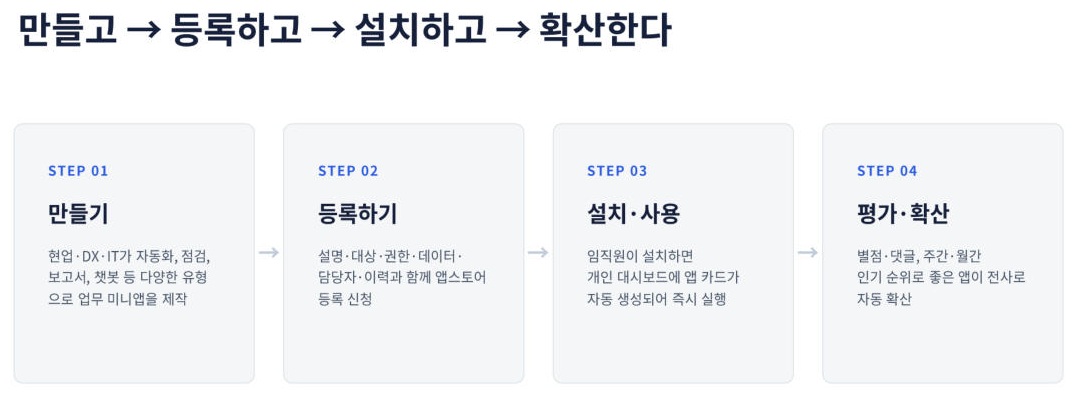
MiWork VibeHub is an enterprise mini app platform that lets employees find internal apps like an app store, install them, and run them from a personal dashboard.

MiWork VibeHub solves this with an internal app store model. Employees search for the apps they need, install them, and the installed apps are automatically added to their personal dashboard. Ratings, comments, and rankings help useful apps spread naturally.

Solution Overview​

MiWork VibeHub Flow

What MiWork VibeHub Makes Possible​

Companies have more internal work tools than they often realize. A spreadsheet refined by a business user, a small automation script created to reduce repetitive work, or a team-specific dashboard can already be a useful operational asset.

MiWork VibeHub gives these tools an official channel so they do not remain on personal devices or inside a single department. The point is to help useful apps be discovered, governed, and reused across the organization.

  • Useful business apps can be shared across the organization.
  • Apps created by individuals can be managed as company assets.
  • Installation status and usage status can be checked.
  • Versions and permissions can be governed systematically.
  • Field ideas can accumulate as digital assets instead of remaining personal convenience tools.

Product Screens​

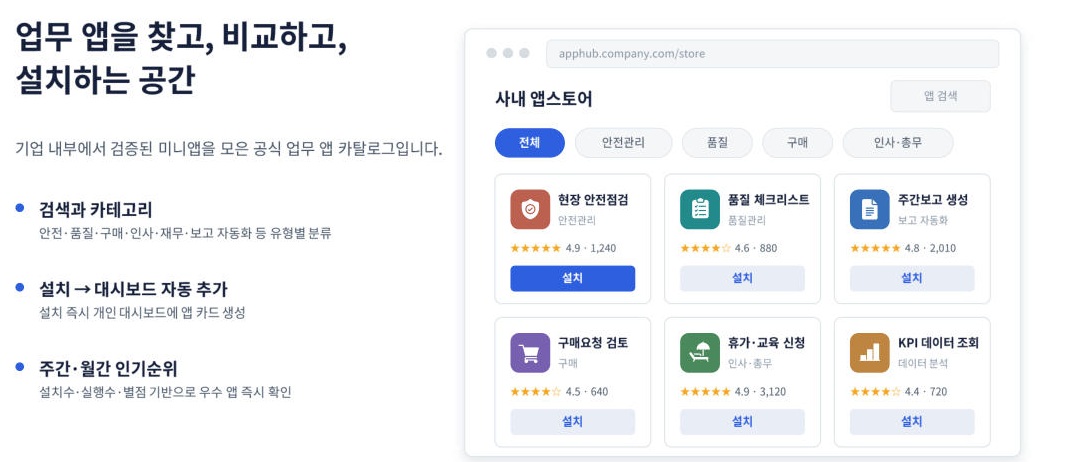
App Store​

The internal app store is an official catalog of verified mini apps. Users can search by categories such as safety, quality, purchasing, HR, administration, and report automation. They can compare apps by ratings and installation counts.

MiWork VibeHub Store

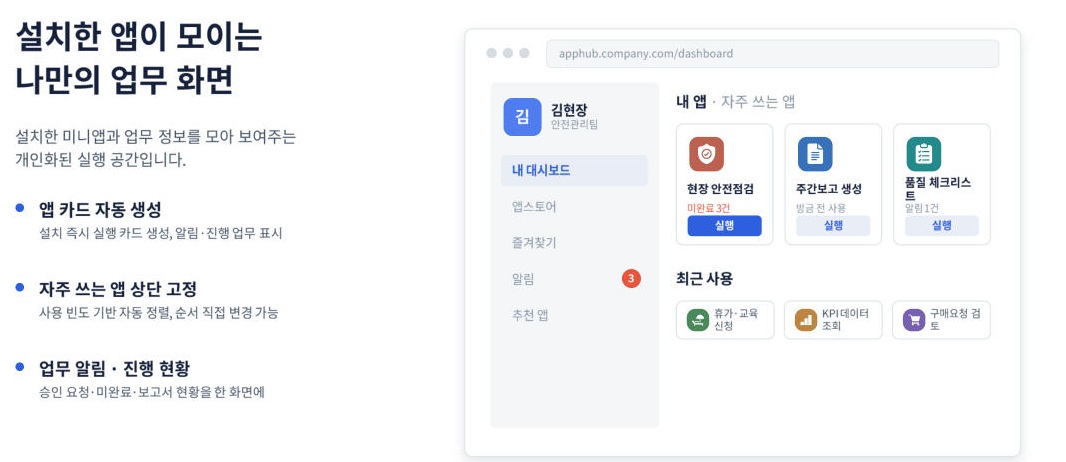
Dashboard​

Installed apps are automatically added to the personal dashboard. Frequently used apps can be pinned, and work alerts such as approval requests, unfinished tasks, and report status can be checked in one place.

MiWork VibeHub Dashboard

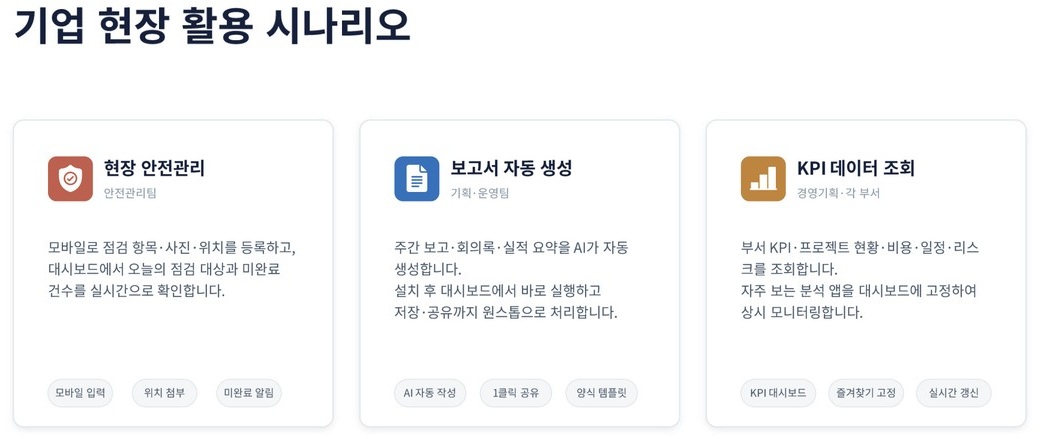
Business App Examples​

Cards for field safety management, report automation, and KPI data lookup make it easier to compare which apps are being used in real work.

MiWork VibeHub Business Scenarios

Watch the Guide Video​

The guide video below shows the basic screen flow of MiWork VibeHub.

Security and Governance​

Convenience is not enough for an enterprise platform. MiWork VibeHub also covers company-account SSO, role-based access control, install/run/access logs, and an app approval process.

By separating the roles of users, app creators, app owners, approvers, operators, and review managers, the platform balances business autonomy with company-level control.

Expected Benefits​

MiWork VibeHub brings business apps that were previously scattered across personal PCs or individual departments into an official channel. By publishing only approved apps and operating them based on usage data, the company can reduce shadow IT, encourage app sharing, and manage field ideas as digital assets.

Employees can run frequently used apps from one screen and reduce repetitive work. Business teams can turn ideas into apps faster and spread best practices across the company. IT and DX teams can manage the app portfolio based on usage data, and executives can see which innovation cases are actually being used.

Closing​

The goal of MiWork VibeHub is not simply to create more apps. It is to make internal mini apps easier to find, safer to install, and easier to scale based on real usage data.

For small ideas from the field to become company assets, organizations need not only tools for building apps but also a platform for collecting and operating them.

The AI Agent Era Through the Lens of MiWork Agents

· One min read
Minisoft AI Platform Tech Blog Author
Product renaming

LUMINUS is now MiWork Agents. This post has been updated to use the new name.

TL;DR The AI Agent era is about multiple agents handling documents, images, data, and workflows together. MiWork Agents is evolving toward a platform that creates, connects, and manages those agents.

AI is no longer limited to a single chatbot.

AI that understands documents, AI that analyzes images, AI that works with data, and multiple AI Agents collaborating with one another are quickly becoming part of enterprise work.

This shift raises new questions for companies.

How should AI Agents be created, connected to business data, and managed safely?

MiWork Agents is evolving as a platform for creating, connecting, and managing AI Agents in response to this change.

The key to the AI Agent era is not simply using more tools. It is building an operating model that reliably connects enterprise work assets with AI.

MiWork Agents Introduced as an Enterprise-Focused AI Agent Platform

· One min read
Minisoft AI Platform Tech Blog Author
Product renaming

LUMINUS is now MiWork Agents. The original article refers to the product by its former name, LUMINUS.

TL;DR An enterprise AI Agent platform is more than a chat screen. It needs to connect documents, data, and business systems while keeping permissions, security, and operating policies under control.

MiWork Agents was recently introduced as an enterprise-focused AI Agent platform.

We believe the important question is not only how to use AI, but how to connect AI Agents and operate them safely.

In enterprise environments, AI Agents need to go beyond conversation. They need to connect with documents, data, and business systems while staying within clear permission, security, and operating policies.

MiWork Agents started from this concern.

We will continue developing MiWork Agents as an AI platform optimized for enterprise environments.

MiWork Agents Featured in ETNews

· One min read
Minisoft AI Platform Tech Blog Author
Product renaming

LUMINUS is now MiWork Agents. The original article refers to the product by its former name, LUMINUS.

TL;DR MiWork Agents was introduced as an enterprise AI Agent Platform. This short note summarizes the direction covered in the article and why companies need a safe way to connect AI Agents with real work systems.

An Enterprise AI Platform for the AI Agent Era​

MiWork Agents was recently introduced by ETNews.

MiWork Agents is an Enterprise AI Agent Platform designed to help companies create AI Agents, connect them with enterprise data, and operate them safely.

Over the past two years, we have been thinking about how AI can be applied to real work and how enterprises should manage AI Agents.

The article introduces key MiWork Agents capabilities, how it can be used in enterprise environments, and its vision as an AI Agent Platform.

MiWork Agents will continue to evolve with changing technology trends.

Read the full article

How AI Changed the Way We Work - Lessons from Introducing LLMs

· 4 min read
Minisoft AI Platform Tech Blog Author

TL;DR Introducing LLMs is not just choosing a model. To make AI useful in daily work, teams need retrieval, permissions, review steps, and security practices designed as one operating system.

You have probably heard the phrase, "AI will take people's jobs." But inside a company, it is often hard to see how AI is actually used. Here is the practical story of what Minisoft experienced while bringing LLMs, or large language models, into our work over the past year.

How a Business Request Becomes an Output​

LLM Business Workflow

A work request does not end with the LLM alone. Internal data retrieval, human review, and final output validation are what make the result usable in real business.

What Is So Different About LLMs?​

Traditional chatbots answered fixed questions with fixed responses. If a user asked in a slightly different way, the answer was often, "Sorry, I did not understand."

LLMs are different. They understand sentences as people write them, read the context, and generate an answer. It feels a little like giving a new employee the entire manual and letting them answer freely.

What We Tried First - And Why It Failed​

Our first attempt was simple. We connected a public LLM API to an internal inquiry bot. The result was rough.

Problem 1: It Did Not Know Our Company​

When someone asked, "What is our vacation policy?", it answered with general advice. It had no way to know Minisoft's actual policy.

Problem 2: It Made Things Up Convincingly​

Sometimes it invented internal policies that did not exist. This is the familiar problem of hallucination. If an employee trusts the wrong answer, the damage can be real.

Starting Again with RAG​

The answer was RAG, or retrieval-augmented generation. The system searches internal documents first, then passes those materials to the LLM with a prompt such as, "Please answer using these sources."

Think of a librarian. When you ask about a topic, the librarian first finds the relevant books, then helps answer from those books. If the answer is not in the book, the system can say so honestly.

What Actually Changed​

New-hire Training Took Less Time​

New employees started asking the bot instead of searching the internal wiki. Questions like "How do I settle travel expenses?" or "My VPN is not connecting" became easier to resolve. Repeated HR and admin questions dropped by about 40%.

Meeting Notes Became Automated​

Upload a two-hour meeting recording, and within five minutes the system produces a summary, action items, and owners. The 30 minutes usually spent cleaning up notes after meetings disappeared.

AI Became the First Pass of Code Review​

On the engineering team, an LLM now performs the first pass when a pull request is opened. It catches obvious mistakes, security risks, and convention violations. Human reviewers can spend more time on the design decisions that matter.

What We Learned​

1. AI is a tool, not magic The key is deciding what to delegate to AI and what must stay with people.

2. Data cleanup is half the work For an LLM to answer well, internal documents must be organized. We had to clean up documents before the AI work could succeed.

3. Start small, then expand We did not try to automate everything at once. We solved one problem for one team first, then expanded after the effect was proven.

Closing​

LLMs are not magic. But used well, they reduce repetitive work and let people focus on more important decisions. In the next article, we will look more closely at how a RAG system is built.

References​

How Should Enterprises Manage AI Agents?

· 3 min read
Minisoft AI Platform Tech Blog Author
Product renaming

LUMINUS is now MiWork Agents. This post has been updated to use the new name.

TL;DR MiWork Agents is an Enterprise AI Agent Platform for creating AI Agents, connecting them to business data, and operating them under permissions and policies. The goal is not simply to use more AI tools, but to manage AI Agents as a reliable enterprise work platform.

Enterprise AI Agent Platform with MiWork Agents​

Over the past two years, we have watched how AI technology changes enterprise work.

LLMs emerged, RAG became widely adopted, and multimodal AI started to understand documents and images. Now, the era of multiple AI Agents working together is approaching quickly.

But as the technology advances, bigger questions appear.

  • How should enterprises connect AI?
  • How should AI be operated safely?
  • How should multiple AI Agents be managed?

We built MiWork Agents as an answer to these questions.

MiWork Agents Enterprise AI Agent Platform

MiWork Agents Is Not Just a Chatbot​

MiWork Agents is an Enterprise AI Agent Platform designed to help companies create AI Agents, connect them to enterprise data, and operate them safely.

For AI Agents to be useful in real work, good conversation is not enough. They need to connect to documents, images, data, and business systems while operating under clear permissions and policies.

Helping Anyone Create Work-Focused AI Agents​

In MiWork Agents, teams can create AI Agents for specific business purposes.

  • Agents that search documents
  • Vision Agents that understand images
  • Agents that analyze data
  • Workflow Agents that automate work

Each agent can operate independently while being managed on a single platform. The goal is not to scatter separate AI features, but to manage agents as enterprise assets.

Safe Connection to Enterprise Data​

AI Agents need to move beyond answering questions and connect to real business work.

They need to connect to file systems, databases, internal systems, and cloud services. At the same time, the enterprise needs to manage who created each agent, which data it can access, and which policies apply.

The Competitive Edge Is Not AI Itself​

We do not believe that competitiveness in the AI era comes only from choosing a better AI model.

What matters more is how quickly a company can connect AI, how safely it can operate AI, and how many business assets it can connect to AI.

MiWork Agents is not just a platform for using AI. It is a platform for creating, connecting, and managing AI Agents.

Closing​

As the number of AI Agents grows, enterprises need a new operating structure. They need a way to create agents easily, connect them to the right data, and operate them within security and policy boundaries.

MiWork Agents aims to help enterprises treat AI Agents not as isolated experiments, but as a platform that can be operated continuously.

Technology Keeps Changing. So Do We.

· 2 min read
Minisoft AI Platform Tech Blog Author

TL;DR mini Labs records how Minisoft prepares, tests, and applies AI and business software in real work. The focus is not technology change by itself, but how that change becomes practical products and workflows.

Two years of AI preparation, and a record of change that continues​

Over the past two years, we have been preparing for LLM-based AI technology.

At first, the work started with building simple chatbots. But over time, the questions changed.

  • Can AI understand documents?
  • Can AI understand images?
  • Can enterprise data be connected safely?
  • Can multiple AI Agents work together?

To answer these questions, we tested many technologies and carried out multiple PoCs and pilot projects.

Some experiments worked better than expected. Some were harder than expected. But every step helped us grow.

MiniSoft Labs 2026 intro

The pace of technology change is fast. Something that felt cutting edge six months ago can quickly make room for a new approach.

After the rise of RAG, multimodal LLMs became more practical, and MCP is becoming a new standard for AI Agents.

Our internal technology stack is changing just as quickly.

Our company and solutions are evolving together​

We continue to upgrade our solutions in line with technology trends.

Starting from simple chatbots, we have expanded into RAG-based knowledge search, Vision AI, multimodal document understanding, MCP-based AI Agents, Enterprise Security, and Mini App Platform.

The solutions we build are less like finished products and more like platforms that continue to evolve.

What we want to record​

MiniSoft Labs is not a place for showing only finished answers.

It is a place to record which technologies we chose, what we tested, what worked, and what was difficult.

Technology keeps changing. So do we.

MiniSoft Labs will record that journey of change.